Business Acceptance Criteria
What are Business Acceptance Criteria?
Business Acceptance Criteria (BAC) are statements of the conditions a solution must meet to be accepted by business stakeholders. They define what “done” looks like from a business perspective — not how the solution is built, but what it must achieve.
For example, if you’re building a login feature, a BAC might be:
- Users must be able to log in using their email address and password
- Users must receive a clear error message if they enter incorrect credentials
- Users must be redirected to their dashboard after a successful login
BACs help everyone involved — from developers to business stakeholders — agree on what needs to be delivered and when it can be considered finished. They prevent misunderstandings about scope and create a shared definition of success.
BACs are referenced using the prefix AC- — AC-1, AC-2, and so on.
Given / When / Then
Business Acceptance Criteria in ArchRepo can be recorded as free-text or in Given / When / Then format. Given/When/Then is the preferred format where possible. See Given / When / Then for background.
Benefits of Given / When / Then Format
- Clarity and Structure: A clear, standardised format that breaks each criterion into preconditions (Given), actions (When), and expected outcomes (Then).
- Testability: Naturally translates into automated tests — each statement can be directly converted into a test scenario.
- Reduced Ambiguity: Explicitly stating the context, action, and expected result eliminates confusion and ensures everyone interprets requirements the same way.
- Better Communication: Bridges the gap between technical and non-technical stakeholders. Business analysts, developers, and testers can all understand and contribute.
- Traceability: Each criterion becomes a discrete, trackable item that can be verified independently.
- Living Documentation: Given / When / Then statements serve as both requirements and test documentation.
Free-text description is also available — useful for narrative context or where the Given/When/Then structure does not fit naturally.
BAC vs Implementation Acceptance Criteria
ArchRepo has two levels of Acceptance Criteria:
| Business Acceptance Criteria (BAC) | Implementation Acceptance Criteria (IAC) | |
|---|---|---|
| Focus | Business outcomes and user value | Technical correctness and build specification |
| Audience | Business stakeholders, product owners | Developers, testers, solution architects |
| Level | High-level — what must be true | Implementation level — how the solution must behave |
| Prefix | AC- | IAC- |
A single BAC normally needs several IACs — the happy path, each exception it implies, and each distinct interface or step involved in delivering it. Together they specify the implementation detail that delivers the BAC’s business outcome.
See Implementation Acceptance Criteria for the lower-level technical counterpart.
AI-Suggested Business Acceptance Criteria
Writing a complete, well-structured set of acceptance criteria from scratch takes time — and it’s easy to miss the exception cases. If your organisation has switched on AI features for this project, ArchRepo can suggest Business Acceptance Criteria for any building block, drafting new ones in Given/When/Then format or reusing an existing BAC elsewhere in the project where one already covers the need.
Using the feature
- Open the model item you want acceptance criteria for (for example, a Business Requirement, Use Case, or API) and switch to Edit mode.
- In the Business Acceptance Criteria section header, click the sparkles icon, then choose Suggest Business Acceptance Criteria.
- ArchRepo reads the item’s specification and narrative and proposes a set of criteria — each one either Reuse (an existing BAC that already fits) or New (a drafted BAC with Given/When/Then filled in for you).
- Review each suggestion — edit the wording, change the type (Happy Path / Exception), or set a category — then select the ones you want and click Accept Suggestions.
The AI aims to cover both the happy path and realistic exception scenarios, and links each accepted BAC to the item automatically.
AI suggestions are based on this item’s written specification and narrative text only. Embedded Figma and Draw.io diagrams are not analysed — always review suggestions against your diagrams and add any missing detail before accepting.
When the AI asks for more detail
If an item doesn’t yet have enough written detail for the AI to draft meaningful acceptance criteria, it asks you a short set of clarifying questions first — rather than guessing or inventing generic criteria that don’t really fit.
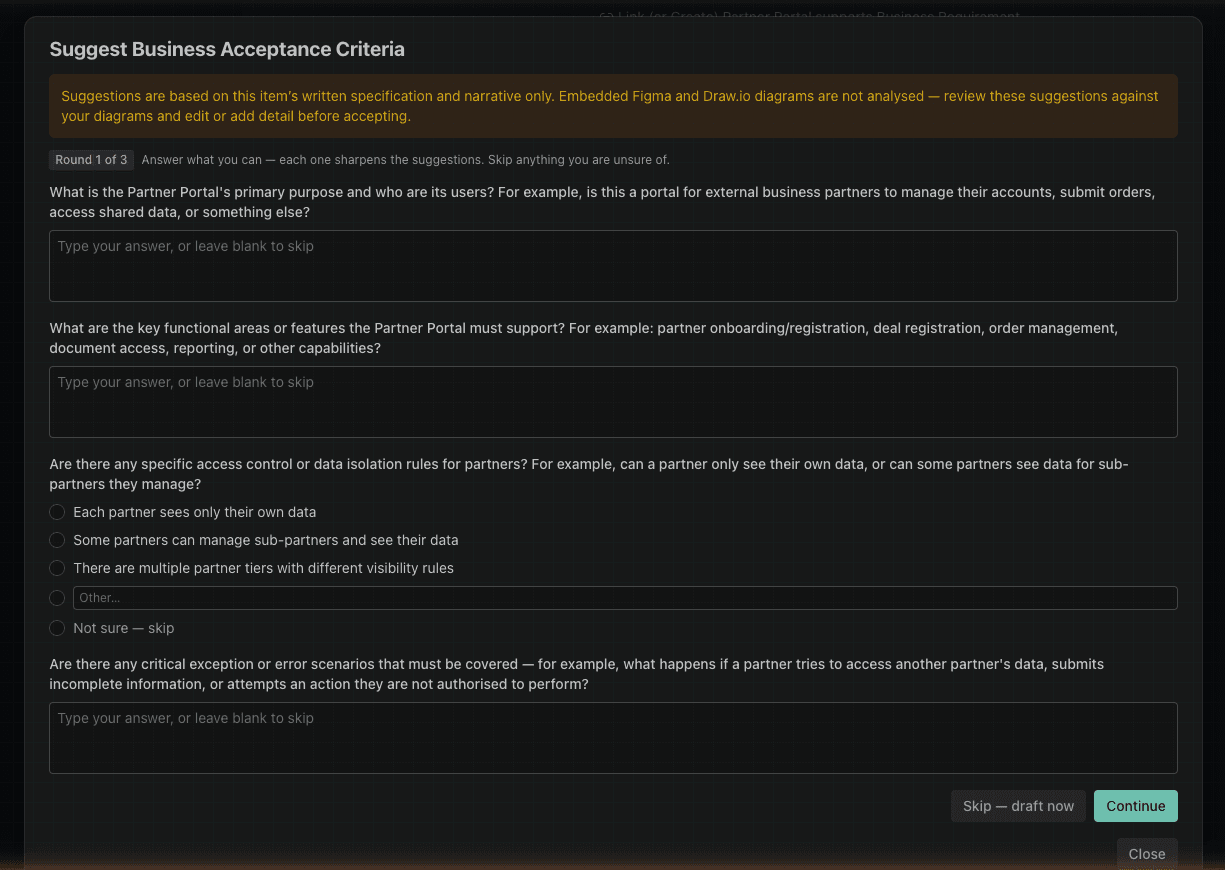
- Answer with free text, choose from the options offered, or select Not sure — skip for anything you don’t know.
- Up to 3 rounds of questions may be asked, each one narrowing in based on your previous answers.
- At any point, choose Skip — draft now to have the AI proceed with the information already given.
- If the item’s specification is already detailed enough, this step is skipped and suggestions are drafted straight away.
Enabling AI suggestions
This feature relies on the AI Enabled project setting. See Project Settings — an organisation admin must switch this on before AI suggestions appear.
ACs and AI Agents
Acceptance Criteria are valuable in standard engineering.
They are also highly effective as inputs to AI code generation agents. Providing well-structured Given/When/Then criteria in your prompt gives the AI agent a precise, verifiable specification — reducing ambiguity and improving the quality of generated code and tests.
Links to Use Cases, Scenarios, and Rules
BACs can be linked to the model items that motivated them:
- Use Cases — the use cases that this BAC applies to
- Business Scenarios — the business scenarios that this BAC must support
- Business Rules — the business rules that this BAC enforces or implements
These inbound relationships mean that when viewing a use case, scenario, or rule, you can navigate directly to the associated acceptance criteria.
Exporting ACs
Within each Model Item’s specification, scroll down to the Acceptance Criteria section and click the Export button to export the criteria for that item.
Fields Reference
See Business Acceptance Criteria Fields for a description of each field and guidance on what to record.