Implementation Acceptance Criteria
What are Implementation Acceptance Criteria?
Implementation Acceptance Criteria (IAC) are the technical specification of what a solution component must do to be considered correctly built. Where a Business Acceptance Criterion defines the business outcome, an IAC defines how the solution delivers it — the interfaces involved, the data exchanged, the rules applied, and what the user or calling system observes.
For example, if a Business AC states “Users must receive a clear error message if they enter incorrect credentials”, the IAC might be:
- Given the user submits a login form with an unrecognised email address, when the API responds, then a 401 status is returned with the error code
INVALID_CREDENTIALS - Given the user submits a login form with a correct email but wrong password, when the API responds, then a 401 status is returned and the failed attempt counter is incremented
Every technical specific in those examples — the status, the error code, the counter — comes from the component’s own specification. An IAC records the implementation your specification defines; it is not the place to decide it. Where the specification is silent, ask the author rather than assuming a convention.
IACs are referenced using the prefix IAC- — IAC-1, IAC-2, and so on.
Given / When / Then
Like Business Acceptance Criteria, IACs can be recorded as free-text or in Given / When / Then format. Given/When/Then is the preferred format where possible.
Benefits of Given / When / Then Format
- Precision: Forces the author to define the exact pre-conditions, trigger, and expected outcome — removing ambiguity from technical specifications.
- Directly testable: Each IAC gives testers an unambiguous basis for the test cases that verify it — there is no interpretation step between the specification and the test.
- Reduces back-and-forth: Developers and testers share the same unambiguous specification. Disputes about what “correct” behaviour looks like are resolved before build begins.
- Covers edge cases: Thinking in Given/When/Then naturally surfaces exception paths — the error conditions, boundary values, and concurrent-access scenarios that free-text tends to miss.
- Feeds AI agents directly: A well-formed IAC is a ready-made prompt component for AI code generation tools. See IAC and AI Agents below.
Free-text description is also available — useful where the Given/When/Then structure does not fit naturally (e.g., a non-deterministic outcome, a visual/UX constraint, or a performance envelope).
How much detail belongs in an IAC?
An IAC is an acceptance criterion, not a test case. It states what must be true of the built component for it to be accepted — pitched at the behaviour you can observe at its interfaces, not at the code inside it.
Include: the interfaces involved, the data exchanged, the fields and controls a user interacts with, the rules applied, and the result the user or calling system sees.
Leave out: internal functions, classes and code structure; test setup such as mocks and stubs; individual test assertions; and exhaustive permutations of input values. Those belong to the tests written from the IAC, not to the IAC itself.
A useful check is one IAC per meaningful behaviour, not one per assertion. If you find yourself writing a separate criterion for every value in a range, you are writing test cases — write one criterion for the rule, and let the test cases cover the range.
Detail must be grounded, not merely precise. Where your specification gives an exact endpoint, status, field name or limit, use it exactly. Where it does not, record what the specification genuinely supports — or get the missing detail agreed — rather than filling the gap with a plausible convention. An assumed detail gets built and tested as though it were a requirement.
IAC and Business Acceptance Criteria
ArchRepo has two levels of Acceptance Criteria:
| Business Acceptance Criteria (BAC) | Implementation Acceptance Criteria (IAC) | |
|---|---|---|
| Focus | Business outcomes and user value | Technical correctness and build specification |
| Audience | Business stakeholders, product owners | Developers, testers, solution architects |
| Level | High-level — what must be true | Implementation level — how the solution must behave |
| Prefix | AC- | IAC- |
A single BAC normally needs several IACs — the happy path, each exception it implies, and each distinct interface or step involved in delivering it. Together they specify the implementation detail that delivers the BAC’s business outcome.
See Business Acceptance Criteria for the higher-level business counterpart.
IAC and Building Blocks
IACs are linked from the solution components they specify. When viewing an Application, Application Pattern, API, or UI Component in ArchRepo, the associated IACs appear in the specification panel — giving each building block its own verifiable technical specification.
This makes it straightforward to answer the question: “How do we know this component is correctly built?” — the answer is in its IACs.
AI-Suggested Implementation Acceptance Criteria
Turning a component’s specification into precise, testable technical conditions is exactly the kind of detail-heavy work that benefits from AI assistance. If your organisation has switched on AI features for this project, ArchRepo can suggest Implementation Acceptance Criteria for a solution component — drafting new ones in technical Given/When/Then format, or reusing an existing IAC elsewhere in the project where one already covers the need.
Using the feature
- Open the Application, Application Pattern, API, or UI Component (or other solution component) you want IACs for, and switch to Edit mode.
- In the Implementation Acceptance Criteria section header, click the sparkles icon, then choose Suggest Implementation Acceptance Criteria.
- ArchRepo reads the item’s specification and narrative — and, where the item already has Business Acceptance Criteria linked, uses them too — and proposes a set of criteria — each one either Reuse (an existing IAC that already fits) or New (a drafted IAC with technical Given/When/Then filled in for you, precise about the interfaces, data and rules your specification defines).
- Review each suggestion — edit the wording, change the type (Happy Path / Exception), or set a category — then select the ones you want and click Accept Suggestions.
Where a suggested IAC is a technical expansion of one of the item’s Business Acceptance Criteria, the suggestion is marked Elaborates <BAC ref>. Accepting it links the new IAC to both the component and that BAC, so you can trace from the business outcome straight down to the exact technical check that proves it was built correctly. The AI also pays particular attention to exception scenarios — these are the ones most often missed, and the most common source of production defects.
AI suggestions are based on this item’s written specification and narrative text only. Embedded Figma and Draw.io diagrams are not analysed — always review suggestions against your diagrams and add any missing detail before accepting.
When the AI asks for more detail
The AI drafts only from what your specification, the item’s Business Acceptance Criteria and its requirements actually state — where a detail it needs is missing, it asks rather than assuming one.
So if an item doesn’t yet have enough written detail — or clearly-defined Business Acceptance Criteria — for the AI to draft meaningful technical checks, it asks you a short set of clarifying questions first, rather than guessing or inventing generic criteria that don’t really fit.
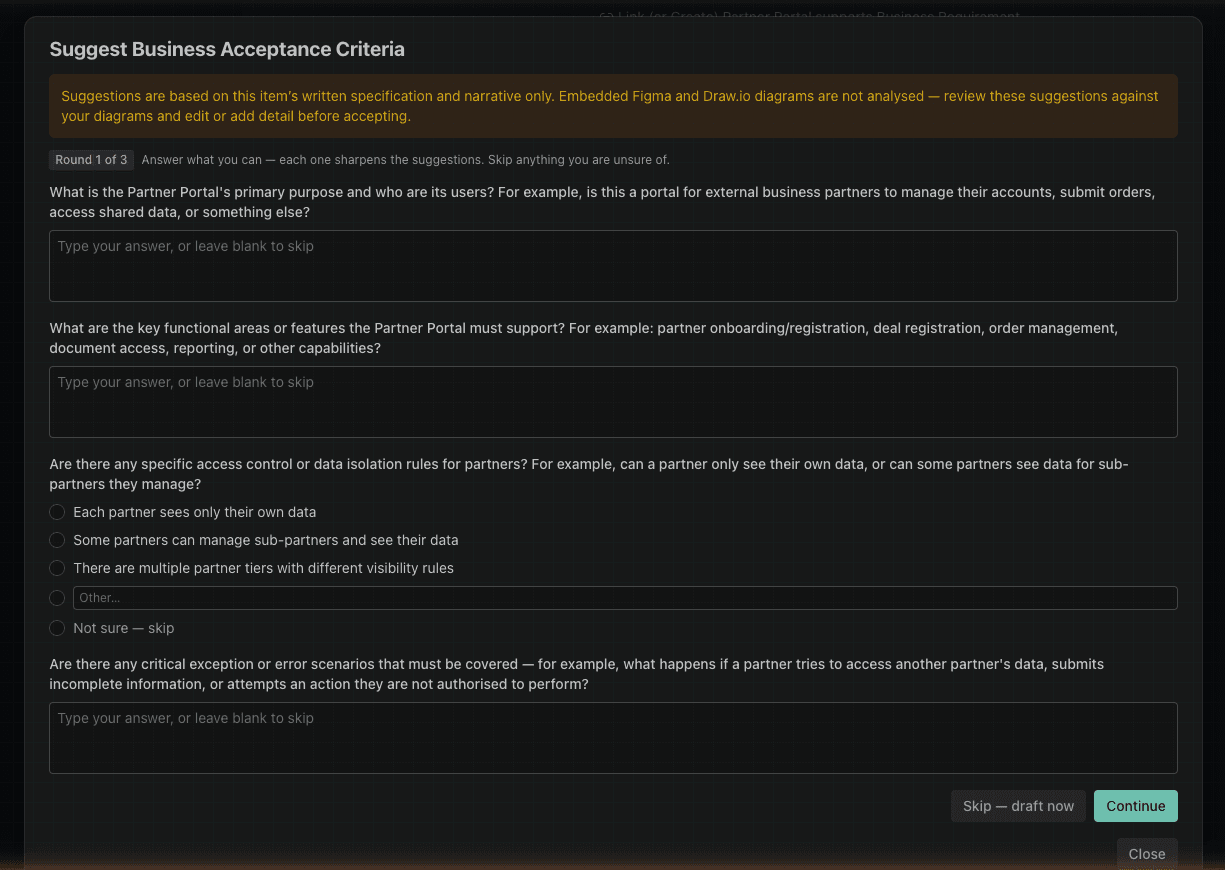
- Answer with free text, choose from the options offered, or select Not sure — skip for anything you don’t know.
- Up to 3 rounds of questions may be asked, each one narrowing in based on your previous answers.
- At any point, choose Skip — draft now to have the AI proceed with the information already given.
- If the item’s specification is already detailed enough, this step is skipped and suggestions are drafted straight away.
Enabling AI suggestions
This feature relies on the AI Enabled project setting. See Project Settings — an organisation admin must switch this on before AI suggestions appear.
IAC and AI Agents
IACs are highly effective as inputs to AI code generation agents. A Given/When/Then IAC provides the agent with a precise, machine-readable specification — reducing hallucination and improving the quality and correctness of generated code and tests.
A well-structured set of IACs for a component can be pasted directly into an AI agent prompt as the acceptance specification, with the agent tasked to generate the implementation and the tests that verify it.
Fields Reference
See Implementation Acceptance Criteria Fields for a description of each field and guidance on what to record.