OpenAPI Specification Editor
The OpenAPI Specification Editor is a full-featured tool built into every API model item in ArchRepo. It lets architects create, maintain, and export formal OpenAPI specifications — the industry-standard format for describing REST APIs — without leaving the architecture repository.
The editor produces OpenAPI 3.0.3 specifications and is found on the Specification tab of any API item, directly below the Narrative section.
Managing Versions
An API can hold any number of specification versions simultaneously. This allows you to track how your API contract evolves over time — for example, keeping 1.0.0 and 2.0.0 side-by-side whilst a new major version is under development.
Versions are displayed in a list, sorted with the most recent at the top (semantic version order). Each version can be expanded to show the full specification preview.
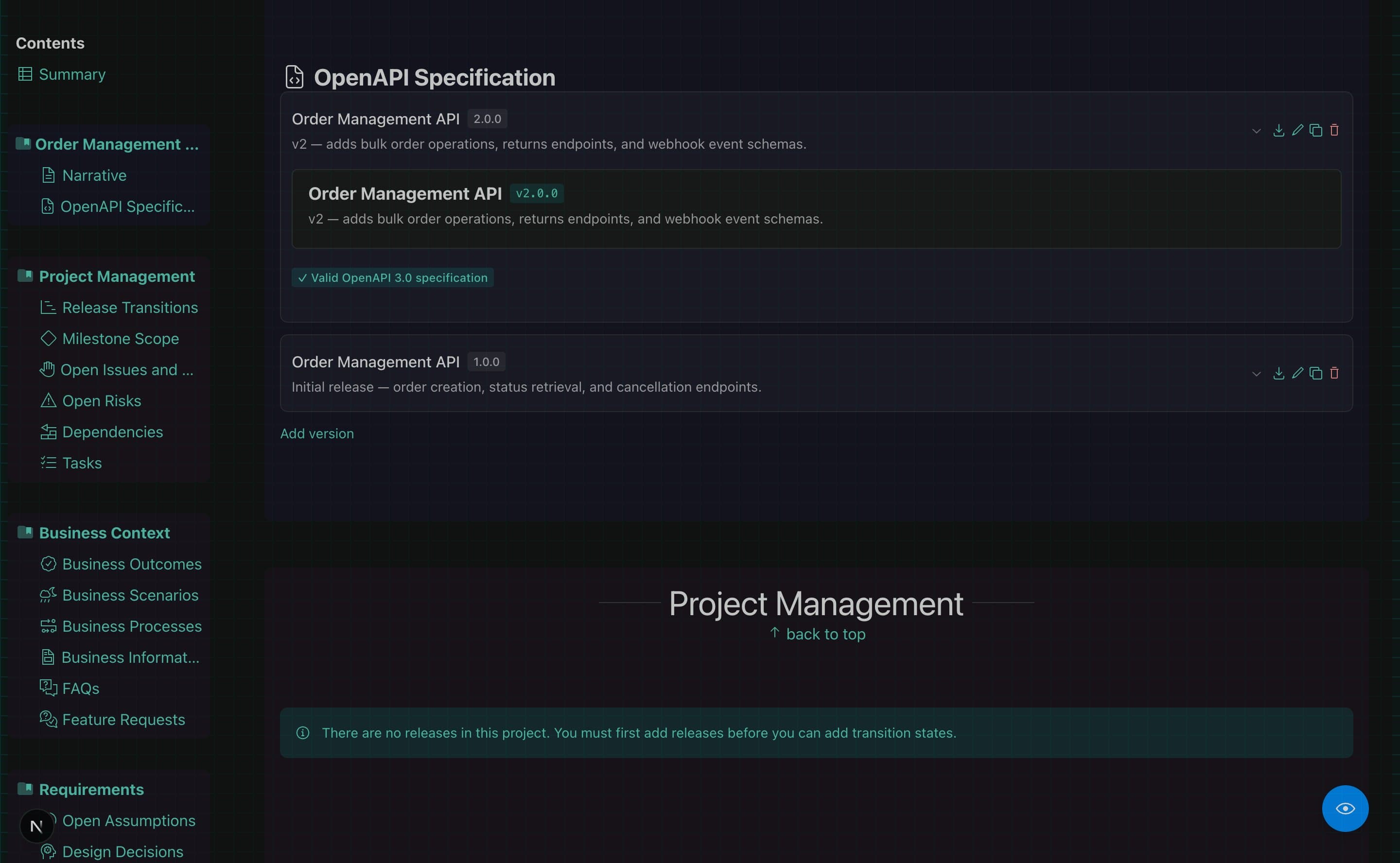
| Action | What it does |
|---|---|
| Add Version | Creates a new specification from a starter YAML skeleton |
| Clone | Duplicates an existing version with an auto-incremented version number |
| Download | Exports the specification as a .yaml file, named after the spec and version |
| Delete | Removes the version after confirmation |
YAML Editor
Each specification version includes a raw YAML editor with syntax highlighting. You can paste an existing OpenAPI document directly into the editor, or build one up from scratch using the Visual Editor and then refine the YAML directly.
- Copy YAML — copies the full specification to the clipboard
- Download — saves the YAML to a file named automatically, e.g.
Payments-API-2.0.0.yaml - Changes in the YAML editor are reflected immediately in the visual preview alongside
Unsaved changes are protected. If you close the editor with unsaved changes, a confirmation dialog will prompt you before discarding them.
Visual Editor
The visual editor gives a structured, readable view of the specification alongside the YAML. A Visual only toggle at the top of the dialog switches between:
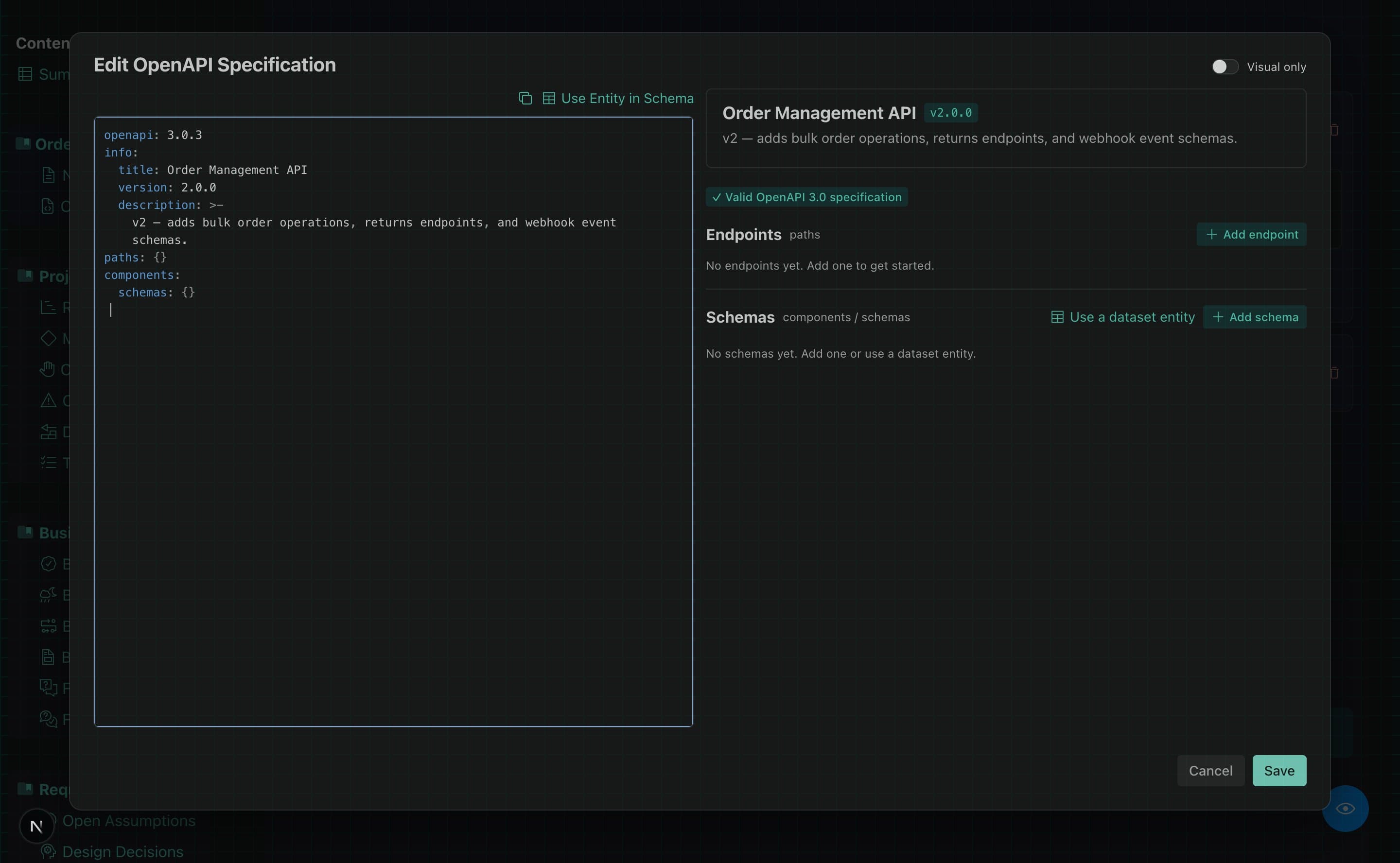
- Side-by-side (default) — YAML editor on the left, visual preview on the right
- Visual only — full-width visual view, useful for reviewing or presenting
Operations (Endpoints)
Endpoints are displayed grouped by tag, then by path. Each endpoint shows:
- An HTTP method badge colour-coded by verb — GET (mint), POST (blue), PUT (amber), PATCH (purple), DELETE (red)
- The path, with path parameters highlighted in amber (e.g.
/orders/{orderId}) - A summary and description
In edit mode, each endpoint has Edit, Clone, and Delete actions. The Clone action copies the endpoint to a new method or path.
Parameters
Each endpoint lists its parameters in a table showing the parameter name, location (path, query, header, or cookie), type, default value, and description. Required parameters are marked with an asterisk.
Request Body and Responses
The editor shows the request body content type and schema reference for each operation, and lists all defined responses with their status codes, descriptions, and schema references.
Component Schemas
The schemas section lists all reusable schemas defined in components/schemas. Each schema card shows:
- The schema name and type
- A table of properties (name, type, format, default, enums, required flag, description)
- Any
$refreferences to other schemas, shown as clickable badges that scroll to the referenced schema
In edit mode, you can add, edit, clone, and delete schemas and their properties.
Linking with Dataset Entities
One data model across your entire architecture. By linking API schemas directly to Dataset entity definitions, your API contract becomes part of a connected, living data model — not an isolated document.
Why this matters
In most tools, an OpenAPI specification exists in isolation. A team defines the schema for a Customer object in the API spec, and separately defines the same Customer in a database schema, a data mapping, or an integration layer — with no connection between them. When the definition changes in one place, the others go stale without anyone noticing.
ArchRepo solves this by letting you import a schema directly from a Dataset entity defined elsewhere in the repository. The result:
- One source of truth — the entity definition in the Dataset drives the schema in the API spec. Change the entity, and ArchRepo can detect that the API spec needs updating.
- Connected data modelling — API schemas, database entities, and data mappings all reference the same definitions. An architect can see at a glance how data flows from a REST request, through a transformation, into a database — all within ArchRepo.
- Data Mapping integration — Dataset entities are also used in ArchRepo’s Data Mappings feature, which allows architects to define field-level transformations between entity definitions. Because an API schema is derived from the same entity, you can map an API payload to a database schema, or trace how a downstream service transforms the data it receives. This level of traceability is difficult to achieve with standalone API tooling.
Importing an entity schema
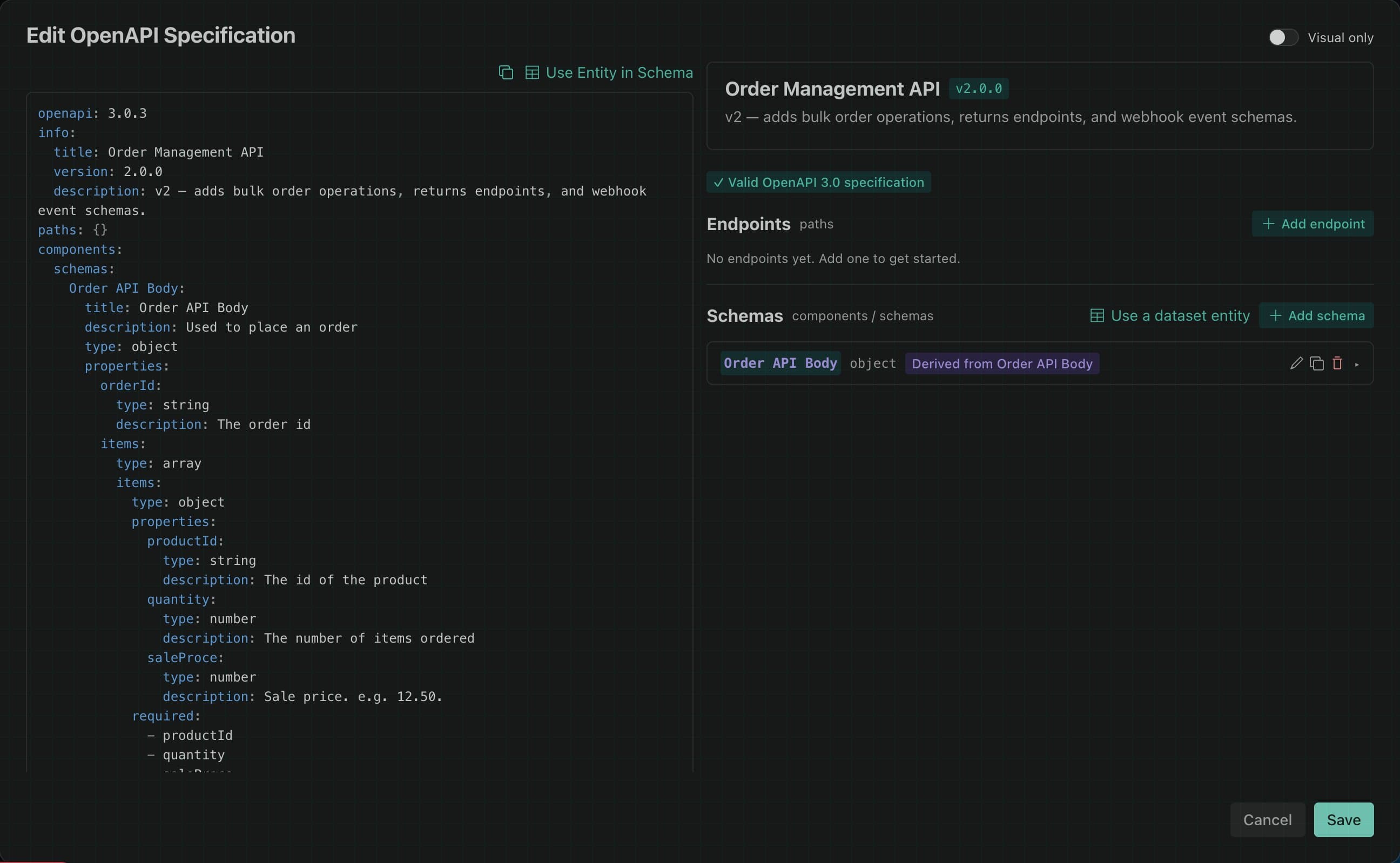
In the YAML editor, click Use Entity in Schema to open the entity picker. In the visual editor, click Use a dataset entity in the schemas section. Both open a dialog where you choose a Dataset and then a specific entity from within it.
ArchRepo automatically generates a components/schemas entry from the entity definition, including all properties, types, formats, and constraints, and inserts it into the specification. A provenance badge — Derived from [entity name] — appears on the schema card to show its origin.
Drift detection
After importing an entity schema, ArchRepo monitors for changes. If the underlying entity is updated in the Dataset — for example a new property is added, or a type changes — the schema in the API specification may no longer match.
ArchRepo detects this automatically and indicates it in the specification view:
| Badge | Meaning |
|---|---|
| Source entity changed (amber) | The entity definition has been updated since the schema was imported; the API spec may be out of date |
| Source entity not found (grey) | The entity has been deleted or moved |
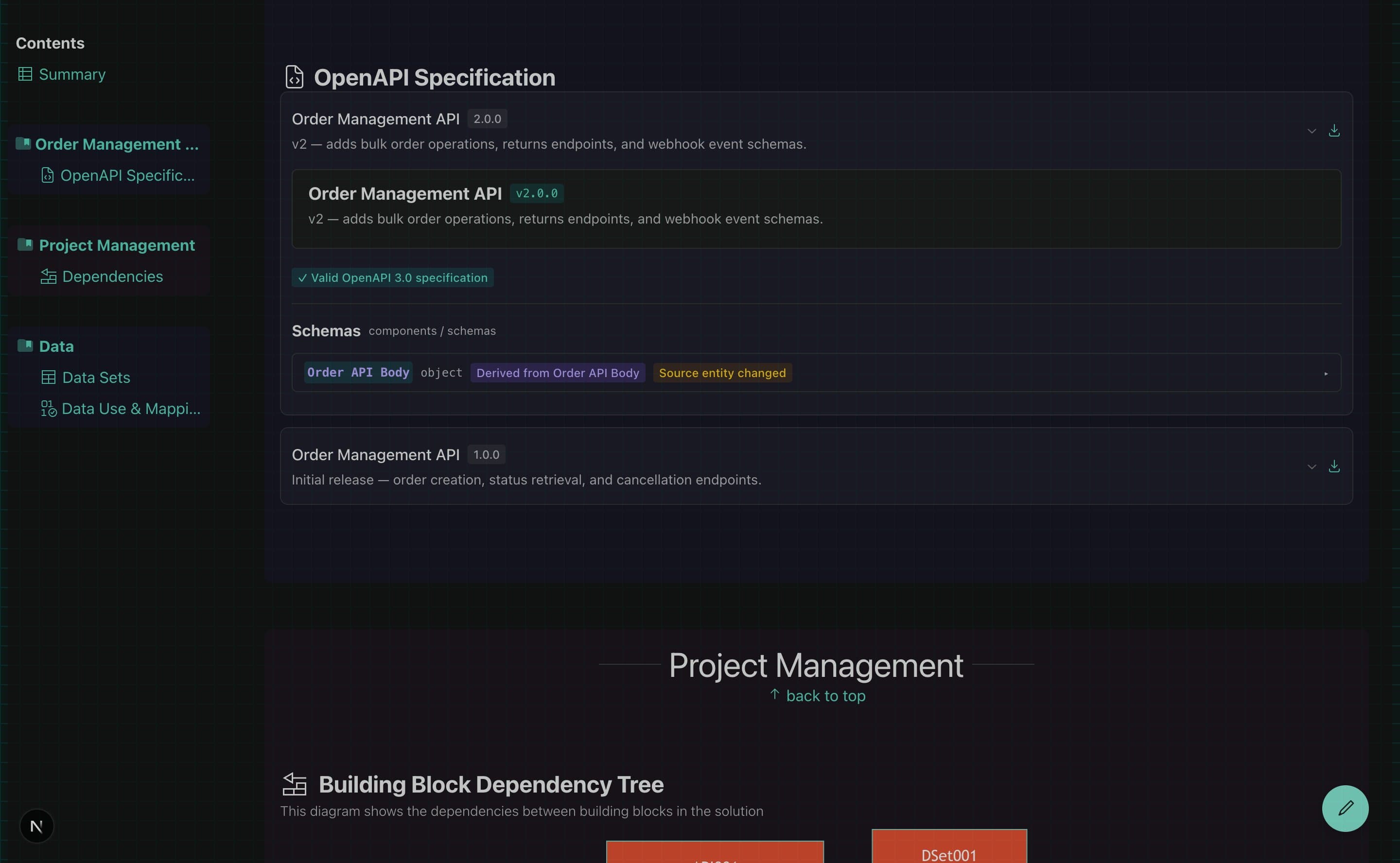
Drift badges are shown when viewing the specification. They are not shown whilst actively editing, to avoid distracting from the editing workflow.
Refreshing from the entity
When a schema shows the Source entity changed badge, you can update it with a single click. In edit mode, a Refresh button appears on the drifted schema card. Clicking it re-derives the schema from the current entity definition and updates the YAML in place, preserving the provenance link for future drift checks.
OpenAPI Validation
As you edit, the editor continuously validates the specification against OpenAPI 3.0 conformance rules. A summary appears below the YAML editor:
- A green checkmark confirms the specification is valid
- A red error list identifies structural problems (e.g. a missing
info.version, a$refpointing to a schema that does not exist, a path parameter not declared as required) - An amber warning list flags advisory issues (e.g. a response description that is missing, an unrecognised status code)
Validation is advisory only — findings do not block saving. This allows you to save work-in-progress specifications whilst still receiving guidance on what needs to be resolved before the spec is complete.
Exporting
The full specification can be exported at any time:
- Download — click the download button on any version in the list, or inside the editor, to save the YAML to your computer. The filename is generated automatically from the spec name and version (e.g.
Order-Management-API-1.2.0.yaml). - Copy YAML — copies the full specification to the clipboard. The button briefly shows a tick to confirm the copy succeeded.