How Readiness Stages Are Worked Out
You don’t set a spec’s stage by hand. ArchRepo reads the signals already on each item — its readiness score, tasks, status, sign-offs, and baselines — and places it in the pipeline automatically.
The Pipeline
Specs move left to right as they mature, from Not started to Approved. Blocked sits off to the side: a spec can become blocked at any point, whenever it can’t progress until something else is resolved.
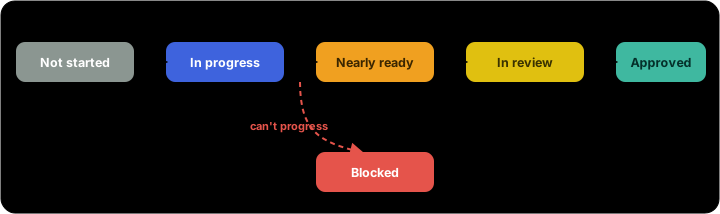
| Stage | What it means |
|---|---|
| Not started | No meaningful specification work yet. |
| In progress | Actively being specified — work is under way. |
| Nearly ready | Close to complete, with a high readiness score. |
| In review | Out for sign-off — one or more approvers are reviewing it. |
| Approved | Signed off and ready to hand to the build team. |
| Blocked | Can’t progress until something else resolves. Shown separately — a spec can be blocked at any stage. |
The Signals
ArchRepo places each spec using whichever signal is the most telling — and it shows you the reason it chose on every row, so the stage is never a black box.
| Signal | What it contributes |
|---|---|
| Sign-offs | Once a review is under way the spec is In review; once approvers have signed off it’s Approved. |
| Readiness score | A higher completion percentage moves a spec toward Nearly ready. |
| Tasks | Open or active tasks are a sign the spec is In progress. |
| Status | The item’s own status (Draft, Approved, and so on) where its type uses one. |
| Baseline | A captured baseline marks a settled, agreed point in the spec’s history. |
Confident vs Inferred
When a spec has none of these signals — no readiness score, no tasks, no status, no sign-offs, no baseline — ArchRepo makes its best guess from the item’s name alone and marks the stage as inferred. Treat that as a nudge: add a readiness score, a task, or a status and the pipeline will reflect where the spec really is.
In short: keep each spec’s readiness score, tasks, status, and sign-offs up to date, and the Progress pipeline stays an accurate, at-a-glance picture of how ready your architecture is to build.